Many platforms ship two products under the same banner: an app your team clicks through and an API that feels like it was built by different people for different objectives. Moving between them (figuring out which endpoint maps to the screen in front of you, what the payload should look like, which IDs to pass, etc.) is tough to say the least.
We’re closing that gap at Recast by launching </> API buttons across every Reporter, Forecaster and Optimizer page in the app.
Click one of these buttons and Recast will hand you the exact request behind the page you’re on including the endpoint, full payload, and an example response that’s pre-filled with that page’s real parameters and IDs. These are not generic snippets from our docs, but actual calls that reproduce what you’re looking at. Take a look at an example:
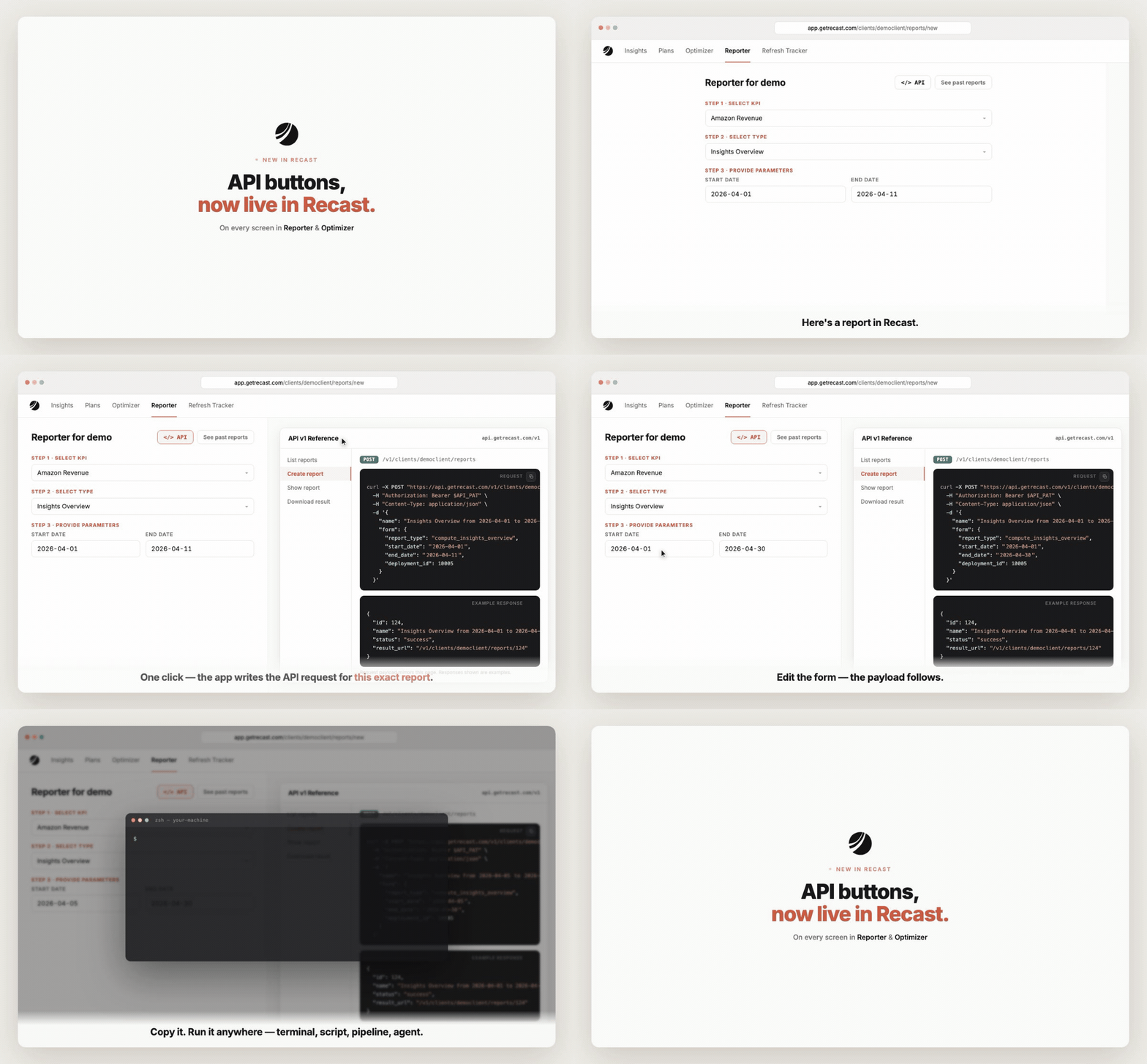
The detail we like most is that API buttons are live right now. Build a report in the UI, change a date, and the payload updates as you go. The interface becomes a request builder for whatever you’re automating, and when you’re ready, you can copy the request and run it in a terminal, a script, a pipeline, or with an agent – and you get back the same result you’d see in the app.
These API buttons are small but have a much bigger idea behind them. Anything you can do in Recast, you can do programmatically – and now the app shows you how, on every screen. Dashboards are for exploring, infrastructure is for operating, and we’re making the line between them disappear.
API buttons are live today. Open any report or optimization and look for it in the top right. Full API docs are here.